
Operating Instructions
Read the JFJ Easy Pro manual online in 13 languages. Scroll through the complete instructions or choose page-by-page reading, then download a PDF in your preferred language.
JANUARY 2025 MANUAL · 13 LANGUAGES
Easy Pro instructions, in your language
Read the full manual here, scroll through every section or turn one page at a time. Choose your language and download a PDF to keep with your machine.
Fresh translations based on the supplied January 2025 manual. Original illustrations are included. The manual contains conflicting pad-color instructions for blue Solution #1; contact JFJ to confirm the correct pad before using that step.
Loading the full manual. PDF downloads are available below.
Transcribed from the supplied JFJ Easy Pro manual, January 2025. Consult the English PDF for the original diagrams and wording.
The supplied English manual contains conflicting pad-color instructions for Solution #1 (Blue). Contact JFJ to confirm the correct pad before using that step.
The English introduction is shown below. For the complete manual, choose a PDF download if the reader does not load.
Page 1 of 8
JFJ EASY PRO™
The Complete User Guide
Thank you for purchasing the JFJ EASY PRO™ Machine, your ultimate solution for repairing scratched discs. Designed for simplicity and maximum effectiveness, our machine is compatible with a broad range of Compact Disc-based products, including Music CDs, CD-ROMs, game discs from Sony PlayStation and Microsoft Xbox series, DVDs, Blu-rays, and more. The JFJ EASY PRO™ is available in both 110V and 220V models to suit various international electrical standards.
It's important to note that the data on a CD is located just beneath the top label, protected by a layer of plastic or polycarbonate. Scratches on this protective layer can prevent the CD reader from accessing the data. By using the JFJ EASY PRO™ to grind and polish away these scratches, your discs will function like new.
This manual will guide you through using your machine effectively. Initially, practicing on 2 to 5 CDs is recommended to familiarize yourself with the process and gauge the depth of scratches.
Begin with the 1-Step Quick Repair detailed on the next page. Ensure the unit is plugged into the nearest appropriate outlet and avoid using it near water.
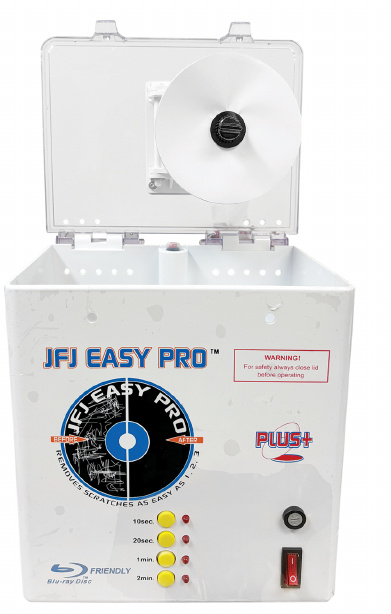
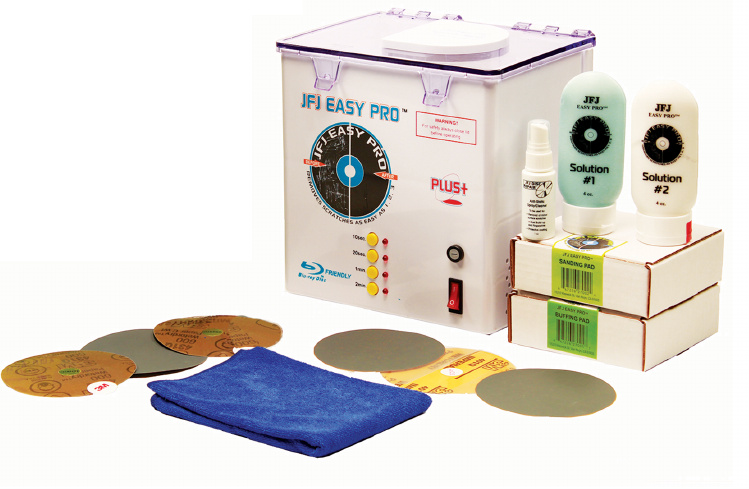
Before starting, please ensure the following items are Included:
Pads:
1 Easy Pro Buffing Pad (White)
1 Yellow Pad
2 Easy Pro Sanding Pads (Black)
Solutions:
1 Bottle of Easy Pro Solution #2 (White)
1 Bottle of Easy Pro Solution #1 (Blue)
Sandpaper:
3 Pieces of Coarse Sandpaper
3 Pieces of Soft Sandpaper
Cleaning Supplies:
1 Anti-Static Spray
1 Blue Cloth
WWW.JFJEASYPRO.COM
Download a PDF in your language
JFJ Eyecon
Download the original English instruction manual for the JFJ Eyecon.